Connect + Magento (Oct 2026): Order Lookup When REST Has No Phone Filter
Quick summary: As of October 30, 2026, Adobe documents a default admin token lifetime of 4 hours and an integration token that lasts until revoked but no longer works as a plain bearer token by default. Its REST API documents no phone filter either. Here is how an Amazon Connect Lambda finds a caller's latest order inside 8 seconds.
Key Takeaways
- As of October 30, 2026, Adobe documents a default admin token lifetime of 4 hours and an integration token that lasts until revoked but no longer works as a plain bearer token by default
- Its REST API documents no phone filter either
- Here is how an Amazon Connect Lambda finds a caller's latest order inside 8 seconds
- As of October 30, 2026, Adobe documents a default admin token lifetime of 4 hours, a customer token lifetime of 1 hour, and an integration token that lasts "until it is manually revoked"
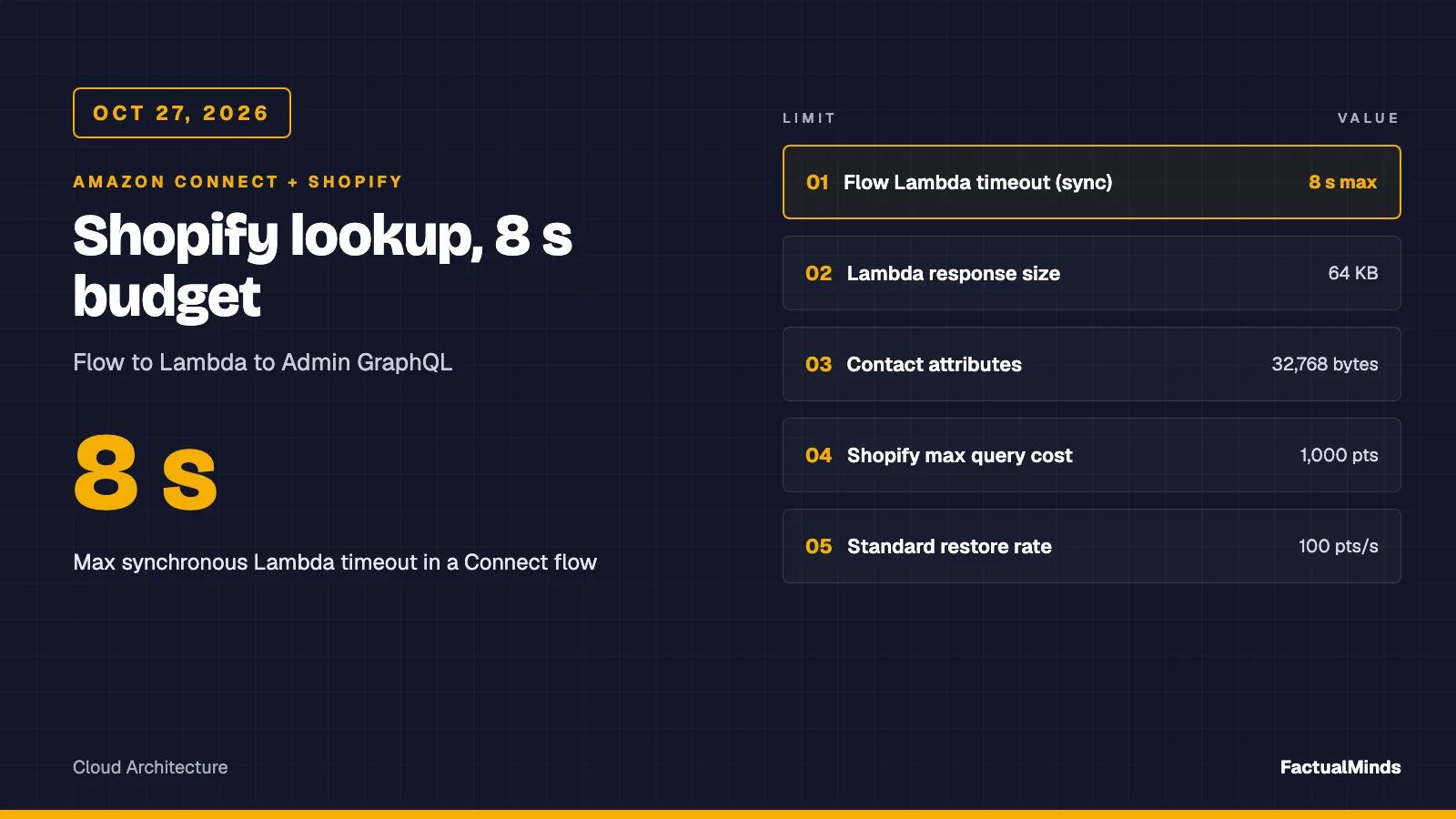
- An Amazon Connect flow waits at most 8 seconds for your Lambda
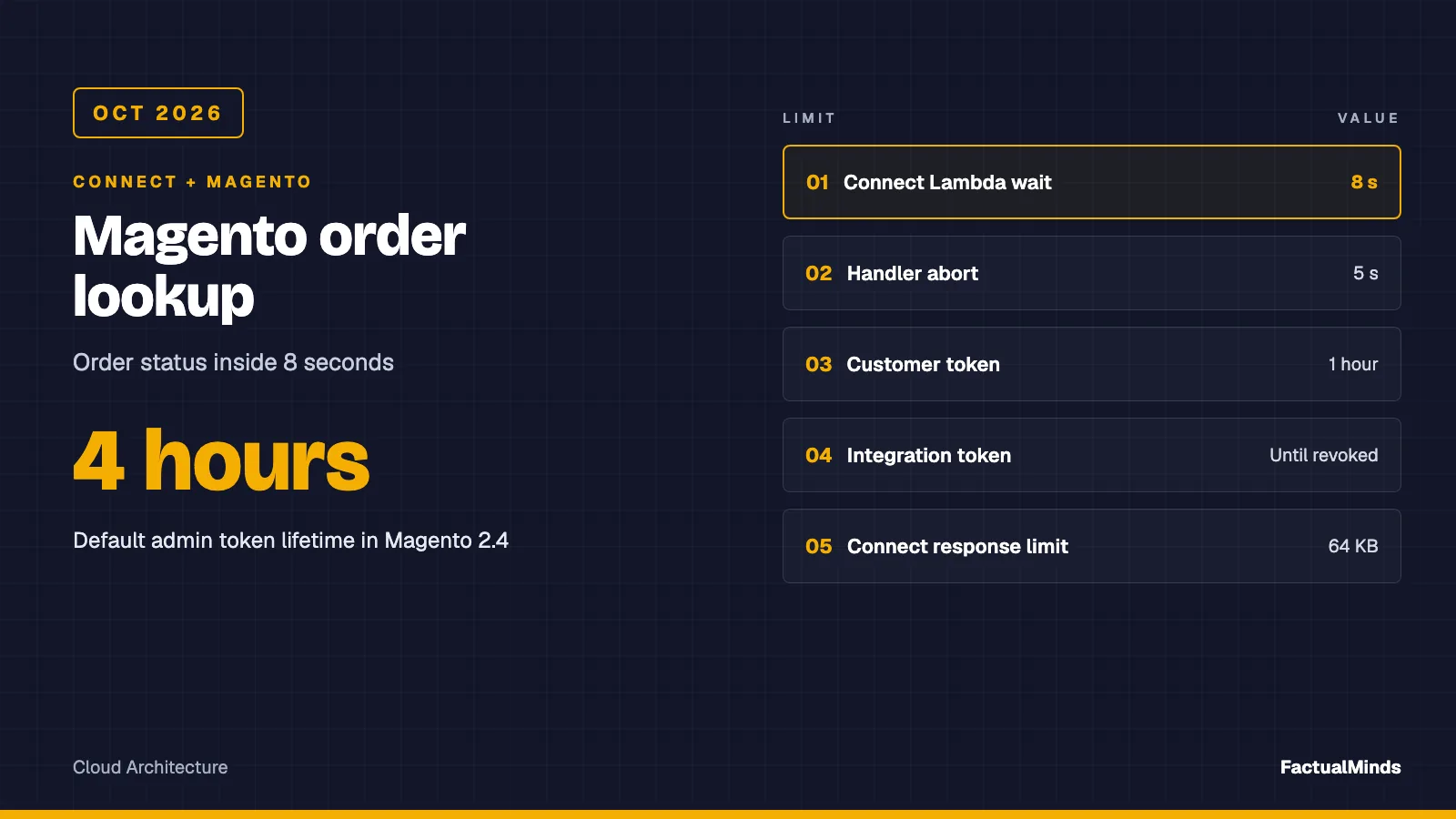
Table of Contents
As of October 30, 2026, Adobe documents a default admin token lifetime of 4 hours, a customer token lifetime of 1 hour, and an integration token that lasts “until it is manually revoked”. It also documents that integration tokens stopped working as plain bearer tokens unless you switch a setting on. An Amazon Connect flow waits at most 8 seconds for your Lambda.
This is the Magento Open Source and Adobe Commerce 2.4.x version of the pattern in the Shopify post. Flow design, Customer Profiles and agent workspace setup live there. The self-hosted angle is shared with WooCommerce, and the hosted-API angle with BigCommerce. The Bedrock agent side of Magento is a separate job: Magento and Adobe Commerce AI agents. Connect-side design is on Amazon Connect consulting and Connect for eCommerce.
Labels in this post: native means built into AWS, supported integration means a vendor-documented API, custom engineering means code you write.
Scope and evidence
This is a design with mocked tests. FactualMinds has no published Connect plus Magento engagement, and nobody here ran this against a live Magento or Adobe Commerce store. Every Magento behavior below comes from Adobe’s pages and the open-source Magento 2.4-develop code as read on October 30, 2026. Claims we could not confirm are marked unverified. We measured no latency; the test plan says how to.
The architecture in one table
| Piece | Label | Role |
|---|---|---|
| Invoke AWS Lambda function block | Native (Connect) | Synchronous call, 8 seconds maximum, STRING_MAP validation |
| Lambda handler | Custom engineering | Parse the event, call Magento, return a flat map |
Magento REST API /V1/orders | Supported integration | Order status, filtered and sorted |
| Magento integration (OAuth 1.0a) | Supported integration | Dedicated read-only credential |
| Secrets Manager | Native (AWS) | Holds the four OAuth values |
| Order-event cache in DynamoDB | Custom engineering, design only | Optional, for stores that cannot take the live load |
| Agent workspace attributes | Native (Connect) | Shows the returned fields to the agent |
We found no native Connect or Customer Profiles connector for Magento, and no Adobe Commerce Marketplace extension for Amazon Connect, in the sources we read. That makes the Lambda and the integration the whole job.
Start with the live lookup: one function and one secret. Add a cache only when a measured p95 says the live route is too slow, and read the cache section below before you do.
Authentication: three options and which to pick
Adobe’s REST pages describe three authentication styles. Token-based authentication uses an admin or customer token. Integration authentication uses OAuth 1.0a with credentials created when a merchant adds and activates an integration. Session-based authentication is for storefront and Admin scripts and is irrelevant here.
Admin token. POST /V1/integration/admin/token is anonymous in the core route file, and the token lasts 4 hours by default. The Adobe page also says admin accounts must authenticate with a two-factor provider, and that some providers need several calls. A Lambda cannot answer a verification code, and a 4-hour expiry means you refresh on a timer or on a 401. Avoid it for a machine.
Integration token as a bearer. When a merchant creates and activates an integration, Commerce generates a consumer key, consumer secret, access token and access token secret. In older versions the access token alone worked as a bearer. Adobe says that behavior is now disabled by default “due to the security implications of a never-expiring access token”, because a leaked one gives “undetected persistent access to a store”. The setting is Stores, Configuration, Services, OAuth, Consumer Settings, or bin/magento config:set oauth/consumer/enable_integration_as_bearer 1. The change is commonly dated to 2.4.4, but the Adobe page we read names no version, so check your release. We also could not confirm whether the setting is scoped per integration or applies to all of them. Assume all.
OAuth 1.0a signing. Each API call carries oauth_consumer_key, oauth_nonce, oauth_signature_method, oauth_signature, oauth_timestamp and oauth_token, and the only signature method Adobe documents is HMAC-SHA256. The Adobe page’s sample client builds the header as OAuth followed by comma-separated, percent-encoded key="value" pairs. The artifact does this with node:crypto in about 25 lines. One caveat from the same page: it is marked as covering PaaS customers only, and Cloud Service customers are pointed to a different REST authentication page. Confirm which product you have before you copy anything.
Recommendation. Use OAuth 1.0a with a dedicated integration. The trade-off is signing code you must keep correct, and a signature mismatch produces a 401 that looks like a revoked token. The artifact’s test recomputes the signature from the RFC 5849 base string, which proves the code agrees with itself and nothing more. If you cannot get signing working on staging inside a day, the bearer flag with a one-resource role and a rotation date is a defensible fallback for a store where nobody else relies on integrations. Neither is verified against a live server here.
The lookup: what Magento’s REST API lets you ask
Orders
GET /V1/orders calls the order repository’s getList, and the core route file requires the Magento_Sales::actions_view resource. Search criteria must go in the URL of a GET. The shape the artifact sends, decoded for reading:
Context: Magento 2.4.x REST, default store code, one filter in one group, eq condition. The base URL and value are placeholders.
GET https://shop.example.com/rest/default/V1/orders
  ?searchCriteria[filter_groups][0][filters][0][field]=customer_email
  &searchCriteria[filter_groups][0][filters][0][value]=jane@example.com
  &searchCriteria[filter_groups][0][filters][0][condition_type]=eq
  &searchCriteria[sortOrders][0][field]=created_at
  &searchCriteria[sortOrders][0][direction]=DESC
  &searchCriteria[pageSize]=1
  &fields=items[increment_id,status,created_at,total_item_count,customer_is_guest,customer_id,customer_email]
Three details matter for a voice flow. Always send pageSize: the Adobe page says that without it “the system returns all matches”, with no documented upper limit, and a returning customer with 400 orders turns a lookup into a payload problem. Always send an explicit sort, because ordering is part of “latest”. And use fields to cut the payload, with the syntax Adobe documents, items[increment_id,entity_id]. A community thread reported fields and searchCriteria not working together on one setup. We did not reproduce that, so the test plan below includes a call with and without fields.
The order interface in the 2.4-develop code defines increment_id, status, state, created_at, grand_total, order_currency_code, total_item_count, customer_id, customer_email and customer_is_guest. The artifact uses six and returns five to Connect.
Customers and the phone gap
GET /V1/customers/search requires Magento_Customer::customer in the core route file. The phone number does not live on the customer entity. It is an address attribute, so a “find the customer by phone” call has nothing to filter on. Adobe’s search page says “Only top-level attributes can be searched”. A Magento GitHub issue, reported on 2.4.2-p2 and reproduced on 2.4-develop in 2022, shows filters such as addresses[telephone] failing with “The attribute name is invalid”. It was reclassified as a feature request and was still open when we read it.
That leaves four ways to handle a caller who gives you only a phone number:
| Option | Label | Honest status |
|---|---|---|
Ask for an order number or email, then call /V1/orders | Supported integration | Works, and finds guest orders. Costs the caller a prompt. |
Filter orders on billing_address.telephone | Unverified | Not documented in the pages we read. The artifact has it behind MAGENTO_PHONE_LOOKUP=1, off by default. Test on staging. |
| Build a phone index in DynamoDB from customer and order data | Custom engineering | Reliable, but you own the sync. See the cache section. |
| Add a small endpoint in a Magento module that joins the address tables | Custom engineering | Fast, but it is code in the merchant’s codebase and upgrade path. |
Whichever you choose, normalize first. Connect gives you E.164, such as +15555550100. A shopper may have typed (555) 555-0100 or 555.555.0100, and we did not find a source on how Magento stores or validates the value. Strip to the last 10 digits on both sides, or the index finds nobody.
Our recommendation is the first row for a pilot: have the flow collect an order number by keypad, since it is printed on the confirmation email, and fall back to email. It is the only row that is supported and cheap. The trade-off is friction, and an order number is not proof of identity, so the flow still verifies a second factor before it reads details aloud.
Guest orders and multiple customers
A guest order has no customer account, so a customer-first route misses it. The order itself still carries customer_email and customer_is_guest, which is why the artifact queries orders directly by email or order number. The returned map includes isGuest as true or false so the flow can skip any “sign in to your account” wording.
If two buyers share a phone number, such as a household line, the phone path asks for five rows, compares customer_id (or the email for guests) across them, and returns ambiguous when more than one buyer appears. The flow then asks for the order number. It never reads out an order because it happened to be first.
Hosting and latency: where the 8 seconds go
Connect gives the Lambda block at most 8 seconds. The artifact aborts its own request at 5 seconds by default, clamps any configured budget to 6 seconds, and returns a fallback. The Lambda timeout should sit a little above that, and the flow block above the Lambda. An uncaught throw is worse than a slow answer, because Connect retries a synchronous error up to 3 times inside the 8 seconds and the caller hears silence.
Adobe Commerce on cloud infrastructure. Fastly sits in front. Adobe’s WAF page says the service is enabled on new accounts within 2 to 3 weeks after provisioning is final, is available on production environments only, and returns a 403 page with a reference ID when it blocks a request. It also lists rate limiting among features the standard WAF does not support, and points to Fastly’s rate limiting and Adobe’s Web API rate limiting pages. We did not read those, so we have no threshold to quote. The practical risk is a 403 or a throttle you did not expect, which is why the handler gives a 403 its own reason, blocked_or_forbidden, instead of calling it an auth failure.
Self-hosted Magento Open Source. There is no vendor edge. What answers the call is your nginx, PHP-FPM pool and database, and the REST route is not a cached page. We found no source on caching of /V1/orders, so assume every call is uncached and measure it. The risk is a sale: PHP workers busy with checkout also serve your lookup, and a contact-center spike during an outage adds load at the worst moment. A lookup that takes 6 seconds is slower than the Lambda is willing to wait and is also taking a worker from a paying customer.
Option for a busy store. A read replica or a separate reporting database fed from the primary would take the load off the order path. We did not verify how Magento routes REST reads to a replica, so treat that as custom work. The alternative is the event-fed cache below.
Events and a DynamoDB cache (custom engineering, design only)
Adobe offers two event mechanisms and the difference matters. Commerce webhooks run synchronous logic: Adobe says to create one only when synchronous communication with the external server is critical, and to consider Adobe I/O Events for asynchronous cases. Putting your AWS endpoint in the order path makes checkout depend on it. Adobe I/O Events for Adobe Commerce sends the event to Adobe I/O Events, which routes it to an App Builder application, which then pulls details from Commerce through REST or GraphQL. The pages we read say the capability is available in Adobe Commerce and do not mention Magento Open Source, versions or delivery guarantees, so availability on Open Source is unverified.
For Open Source, or for any store where that path is too heavy, the fallbacks are custom: a small module in the Magento codebase that publishes order changes to SQS or EventBridge outside the request, or a scheduled export of orders changed since the last run. Both are code in the merchant’s stack, and both are untested here.
The cache itself is the BigCommerce shape. An event carries an order reference. A handler fetches the order once over REST and upserts one DynamoDB item keyed by the order’s increment_id, with indexes for the caller’s identifier. For phone, store an HMAC of the last 10 digits with a secret key rather than a bare SHA-256: a phone number space is small enough to brute-force an unkeyed hash. Do not assume ordered delivery, write with a condition on updated_at, and repair gaps with a scheduled re-list of recently changed orders.
Error and fallback mapping
The handler never throws. Every failure becomes lookupStatus FALLBACK with a fallbackReason, and the flow routes on the reason.
| Situation | fallbackReason | What the flow should do |
|---|---|---|
| 200 with one order | OK (empty reason) | Verify a second factor, then read status |
200 with an empty items list | no_match | Ask for an order number or email, then an agent |
| Two buyers behind one phone | ambiguous | Ask for the order number; read nothing |
| 401 | auth | Agent with an apology; page the owner, since every caller will hit it |
| 403 | blocked_or_forbidden | Agent; check the WAF reference ID and the integration’s resource |
| 429 | throttled | Agent. Do not wait: the budget cannot absorb a back-off |
| 400 | bad_request | Agent; likely an unsupported filter such as the phone field |
| 5 seconds elapsed | timeout | Agent. Never say “no order”: we could not check |
200 without items, or an order without increment_id or status | bad_response | Agent; this is a proxy page or a schema change, not an empty list |
| Missing URL or credential | not_configured | Agent |
| Phone only, phone path off | phone_unsupported | Ask for an order number or email |
The bad_response row is the one people skip. A WAF challenge page or a maintenance page can return 200 with HTML, and treating it as an empty list tells every caller they have no orders. The test pins both a non-JSON body and a JSON body without items.
Security and PII
- Integration role. Create a dedicated integration whose resource list holds only the order view resource,
Magento_Sales::actions_view, which is what the core route file requires forGET /V1/orders. AddMagento_Customer::customeronly if you add the customer search route. The admin tree labels differ by version, so confirm the resource in the integration’s API tab. Do not reuse a person’s admin account. - Secrets. Keep the four OAuth values in Secrets Manager and give the Lambda role
secretsmanager:GetSecretValueon that one secret. The artifact reads environment variables for brevity only. - Revocation. An integration token lasts until revoked. Write down who revokes it and when you rotate.
- Minimum response. The map holds an order reference, a status, a date, an item count and a guest flag. No name, email, phone or address, and the log line carries status, reason, duration and HTTP code only. The test pins that the phone, email and order number never reach the log.
- Verification before disclosure. A caller ID is not authentication, and an order number is printed on emails and packing slips. Ask for a second factor in a separate step.
- Compliance. Using AWS services does not make the flow compliant with a privacy law or PCI DSS. Keep card data out of this path.
Test plan
node --testin the artifact folder: twelve tests withfetchmocked, covering the happy path and URL shape, no match, two buyers on one phone, a guest order, the phone path off by default, status mapping, the timeout abort, a malformed 200, missing configuration, the log line and the OAuth signature.- On a staging store, call each path: order number, email, a guest email, a phone with the opt-in flag, an unknown email, a revoked integration and a deliberately wrong secret.
- Confirm the signature against a real Magento before you trust it. A 401 on every call with correct credentials points at the base string or the encoding of query parameters.
- Send the same order call with and without
fields, and with and without a sort, and keep the one that returns the expected row. - If you are on cloud infrastructure, send 20 calls from a Lambda in the Region you plan to use and read any 403 reference IDs.
- Measure p50 and p95 over at least 50 calls at a busy hour before choosing live or cached. We did not run that benchmark.
What to do this week
- Decide your identifier. Pilot with order number and email, and add the phone question only after you have tested the phone filter or built an index.
- Create the
connect-order-lookupintegration with the single order view resource, activate it, and store the four values in Secrets Manager. - Run the artifact tests, then point the handler at staging and work through the table above.
- Read your 2.4.x release notes for the bearer setting, and choose OAuth signing or the flag on purpose.
- Put a CloudWatch metric filter on
fallbackReasonand alarm onauthandblocked_or_forbidden, since the handler never throws and the LambdaErrorsmetric stays at zero.
What this post doesn’t cover
- A live run against any Magento or Adobe Commerce store. All tests mock
fetch, and the OAuth signing and the phone filter are unverified against a real server. - The Connect flow, Customer Profiles and agent workspace. See the Shopify post.
- GraphQL. We read only the REST routes.
- Whether Adobe I/O Events and Commerce webhooks are available on Magento Open Source, and their delivery guarantees.
- Adobe’s Web API rate-limit thresholds and Fastly rate-limit configuration. We did not read those pages.
- Adobe Commerce as a Cloud Service authentication, which Adobe documents separately.
- A built cache, a replica design, writes back to Magento such as cancellations, and any costs. No benchmark or cost figure was measured.
Sources
- Adobe: token-based authentication
- Adobe: OAuth-based authentication
- Adobe: construct a request
- Adobe: search using REST
- Adobe: Services, OAuth configuration
- Adobe: Fastly WAF service
- Adobe: Commerce webhooks
- Adobe: Commerce events
- Magento issue 35586: customers/search cannot filter by address telephone
- Magento 2.4-develop source: Sales webapi.xml, Customer webapi.xml, Integration webapi.xml, OrderInterface
- AWS: Lambda functions in Amazon Connect flows
- AWS: integrate external applications with Customer Profiles
Frequently asked questions
Can I find a Magento customer by the caller's phone number through the REST API?
Which authentication should the Lambda use, an admin token or an integration?
When should I not call Magento live from the Connect flow?
What could go wrong on Adobe Commerce Cloud?
Are Adobe Commerce webhooks a good way to push order changes into a cache?
Is there a native Amazon Connect connector for Magento or Adobe Commerce?
Does this post prove it works on our store?

AWS Cloud Architect & AI Expert
AWS-certified cloud architect and AI expert with deep expertise in cloud migrations, cost optimization, and generative AI on AWS.